

One of the many updates being tested for HubSpot reporting right now is the so called "filter presets" that you can apply to dashboards in order to save a combination of many filters instead of configuring the same list of filters over and over. You can almost compare it to a dashboard version of the "views" we normally use for CRM records like contacts and companies.
I have tested this new feature with real use cases, and this is an introduction of what I've learned so far.
You can read the official update notes and join the Beta from your HubSpot account. Click Product updates in the navigation, and search for "Filter Presets on Dashboards". Not to be confused with the update "CRM filtering in reports" which is also currently in Beta.
You can set default filters on a dashboard
The best feature of this update is in my opinion the ability to set a default preset to load on a dashboard. Up until now, everyone had to configure their filters individually, which can be hard to coordinate when you have several teams interested in different parts of the same dataset.
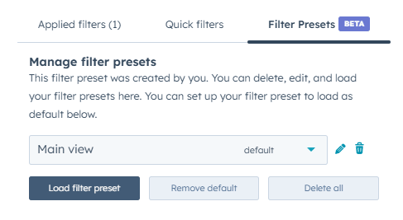
A duplicate of every single report in a new dashboard was required to avoid this up until now, but with a default set of filters, you can know that everyone has the same view, and reuse reports on several dashboard to a much larger degree than before.
The use cases that work great with this update
In addition to the default filter, the presets make filtering a lot easier and differ from the "quick filters" in a couple of ways. The main difference is that instead of adding filters for one property at a time, you can now save a preset including many different properties and targeting separate object types at once. In one example, using filters for separate markets on a dashboard would require at least one quick filter for each object, but often more.
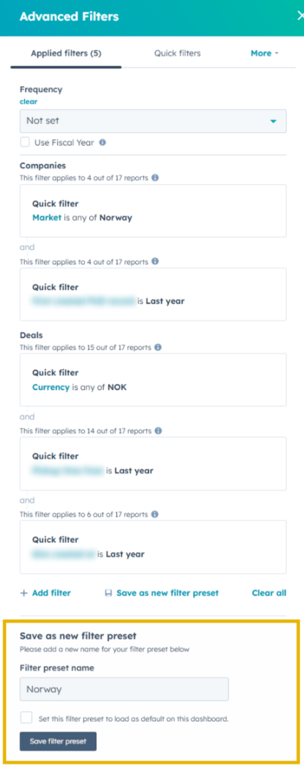
Now, I can save my series of five filters into a single preset to load back later.
The room for improvement
Keep in mind this is a brand new feature, not even released yet. It is a great update that will save me time almost weekly, and the following is simply my thoughts on what I think could make it even better.
Not including frequency
One of the downsides I've found about quick filters before, and presets now, is that they do not take frequency into account. When I change the date range from last year to last month I typically want to change the frequency as well, or it makes no difference.
As of today, the filter presets also exclude the frequency parameter, so you will need to open the "advanced filters" menu to change that as well.
Clunky interface
The upside of presets is that you don't need to update to much in the filters every time, but at least right now, it is still hidden away in the Advanced filters section. This works great for Ops and Admins, but this could be made more available to the everyday user to utilize right away.

For all I know, this could be changed when the beta is concluded.
Adding an easily accessible dropdown like the quick filters would be a great addition to an otherwise great update.