

It is becoming more and more difficult even for smaller companies to ignore the need for strict routines in CRM systems and marketing activities to comply with international regulations like GDPR and marketing communication laws.
I will dive into the practical elements of how you can understand and properly implement privacy and GDPR settings in HubSpot, and ensure you are gathering proper data and documentation in the process.
First of, let's begin by identifying the three topics that needs to be addressed, and how they are related to each other: Data protection, Data privacy, and Communication privacy.
What is Data Protection?
When we hear data protection, we often associate it with GDPR, also known as the "General Data Protection Regulation". GDPR is a European legal framework for data protection, and applies to all companies doing business in the EU or EEA regions.
The subject of data protection is about preventing unauthorized parties from accessing information. Personal information is typically the main focus in this context, while "sensitive data" like financial or health related information has even stricter requirements for storage and protection.
Data protection routines should address how you collect, store, and provide access to such information, along with properly informing your contacts and document their consent before you process their personal data.
What is Privacy?
In the context of marketing and CRM system management, Privacy refers to the same data protection of course, but also involves a person's right to decide if and how you communicate with them, especially when automated tools are involved.
It also involves a person's right to insight into what information you have about them, how it is processed and protected, and to withdraw any given consent if they no longer want your company to have this information about them.
NB: Some regions and industries will in some cases have exceptions to personal data being deleted, even without consent. Examples of this can be financial matters, participation in government activities, or any case where public access to the information is entitled by law and therefore can not be deleted.
HubSpot terminology
Here is an introduction to some of the HubSpot specific terms used that will also be referred to in the rest of this article.
Legal basis of processing a contact's data
This is a default contact property in all HubSpot accounts, used to store one or more relevant types of legal basis for each individual contact. The value set to this property should give context to which of the accepted legal reasons to store a person's personal information to your CRM, applies to this contact. If you do not have any legal basis to process a contact's information, you are not legally allowed to store their information to HubSpot.
Communication subscriptions
HubSpot Refers to Subscription types or communication subscriptions as each category of information that you can allow your contacts to subscribe or unsubscribe from. There is no clear requirement to have many or few categories, but you should make it easy for your contacts to unsubscribe to unwanted information while still receiving relevant emails from you.
opt-in and opt-out
Opt-in and opt-out are different words meaning the same as subscribe or unsubscribe to communication. Each contact will have a subscription status to each of your communication subscriptions, which can be one of three possible statuses: opt-in (subscribed), opt-out (unsubscribed), or neutral (never indicated an interest or disinterest in these emails).
Basic data protection and consent in HubSpot
Collect legal basis of processing contact's data
Consent to store a contact's data is stored on each contact record in HubSpot, in a property called "Legal basis of processing contact's data". While it is technically possible to add contacts to your CRM without addressing this, most of the ways to add new contacts has this value easily available, and it can be enforced to make sure it is also collected.
Note that several of the accepted categories are often applicable, and instead of selecting the "best" answer, you can assign all that apply.
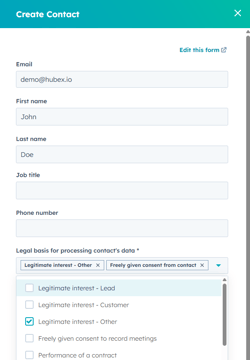
As you can see from this image, the legal basis is required, so I can not create a contact in our CRM without defining why I have the legal right to store this contact. The same should also be enforced in imported files to HubSpot, or included as a field in your forms.
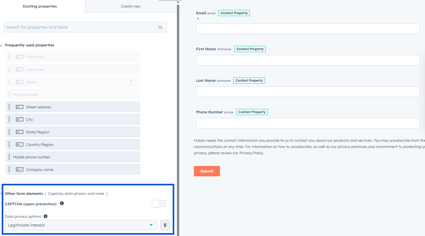
Make sure to always enable your data privacy options, and legal basis will be set automatically to contacts submitting your forms. Make sure to write a clear explanation to what the contact is agreeing to so there are no misunderstandings. It is your responsibility that contacts understand what consent they are giving you.
Collect opt-in to relevant communications
Opt-in or subscriptions are mostly handled automatically in HubSpot, either by consenting to specific communication subscriptions in the data privacy section of a form, or by opting in contact's with a workflow automation, for example when they become a customer.
Opting in a contact with a workflow can only happen if they are neutral to the subscription (never opted in our out), or if they have it already, but will not work if the person has previously unsubscribed. If that happens, they have to opt in themselves with a new form submission.
This is why including subscription types to your form is typically a good idea even if you expect the audience to already have accepted this, to make sure your emails are sent. You can also include several subscription types to a form, and have one or more of them be optional.
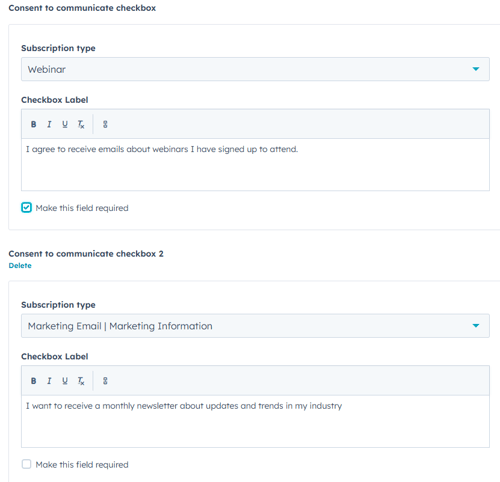

Keep in mind you should usually require the subscription type used in your first follow-up or confirmation email. In the example above, which is part of a sign up form for a webinar, it makes sense to require consent to communication about the webinar they sign up to attend, but an unrelated newsletter should be optional as it does not have any implication on the specific campaign.
Turn on data privacy settings (Privacy by default)
Turning on the data privacy settings will make sure you follow your own rules, and prevent you from accidentally sending emails or storing information without the proper consent information registered.
The two most apparent differences you will notice by turning this on is "privacy by default" in marketing emails, and legal basis required to send one-to-one email with HubSpot.
Privacy by default means you should treat any contact with a neutral subscription status as someone you do not have permission to contact by automated means. HubSpot will always prevent you from sending automated emails to unsubscribed contacts, but after turning on the proper privacy settings, only those who have been opted in will receive automated emails.
Legal basis required to send one-to-one email with HubSpot just means in order to send an email, you will first be asked about the relevant legal basis for that contact. This is to ensure you are allowed to store their information in the CRM in the first place. One-to-one communication typically don't have as strict rules for gaining consent in advance, but is still not allowed if they unsubscribe to your emails.
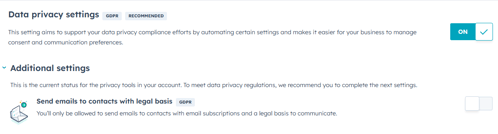
You can turn on these settings by going to the settings page in your account, and selecting "Privacy & Consent".
Disclaimer about legal advice!
We want to remind you that Hubex does not provide legal advice, and you should always consult a lawyer about legal questions. This post is intended to give you insight into the technical elements of collecting and managing data effectively, but is not a guide on how to comply with legal complexities. We do not take responsibility for any consequences of following this process or the advice in this article, legal or otherwise.