

When speaking with sales reps, a common challenge mentioned is a struggle to quickly identify stalled and at-risk deals, and to spot where they need to put in some extra work to increase the likelihood of closing the deal.
One of my favorite ways to visualize how deals are progressing, help reps spot potential issues, and guide them to the next high-impact action is deal tags.
Deal tags provide a clear, color-coded visual indicator of how deals are progressing, helping sales reps quickly spot potential issues and guiding them toward the next high-impact action.
This approach becomes even more powerful when linked directly to your sales framework, clearly highlighting the critical steps reps must take to increase the likelihood of closing deals and avoid common pitfalls like overly optimistic assumptions – often referred to as "happy ears."
The visualization can look something like what you see above, where we’re using the list view in the deal pipeline with deals tags.
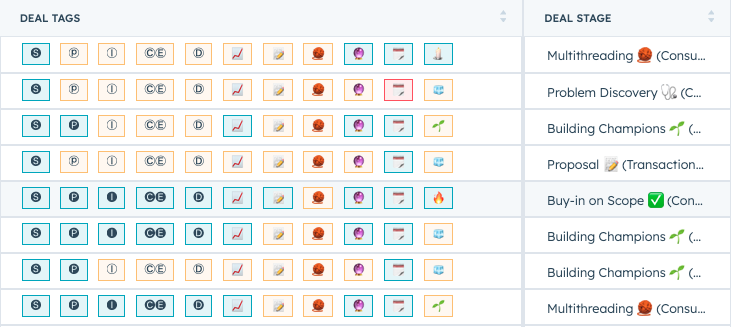
Blue tags = Completed or up-to-date actions
Yellow tags = Actions not yet completed or missing information
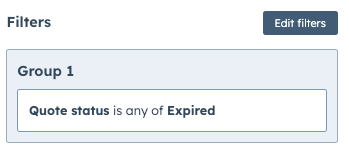
Red = Warnings indicating issues such as overdue deals or expired quotes
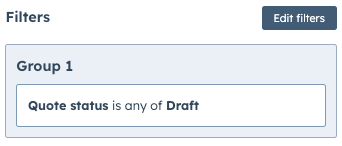
Grey = Actions currently in draft or pending status
In this example, I’ve used tags based on:
Sales Framework (SPICED):
- Blue: Required information fields are completed
- Yellow: Missing required information fields
Shared Business Case (📈):
- Blue: A shared, co-created business case document exists
- Yellow: No shared business case document yet created
Quote Status (📝):
- Blue: Quote has been shared and is active
- Yellow: No quote created yet
- Grey: Quote is in draft status
- Red: Quote has expired and needs immediate attention
Multi-threading (🧶):
- Blue: Multiple stakeholders identified and documented clearly with priorities, metrics, and sentiment
- Yellow: Single-threaded deal; additional stakeholders need to be identified and engaged
Forecast Status (🔮):
- Blue: Forecast is updated according to the agreed-upon cadence
- Yellow: Forecast is outdated or incomplete
Deal Due Date (🗓️):
- Blue: Due date is set and not overdue
- Red: Deal is overdue and requires immediate follow-up
Deal Score:
Indicates overall deal momentum and client engagement level (customized scoring criteria recommended)Always add descriptions to your tags
To maximize the effectiveness of your deal tags, I highly recommend adding clear descriptions to each tag.
These descriptions will appear when hovering over each tag, providing instant clarity to your reps and ensuring everyone understands exactly what each tag represents.
This simple step significantly reduces confusion and boosts adoption across your sales team.


By implementing clear, color-coded deal tags in HubSpot, your sales team gains immediate visibility into deal health, potential issues, and clear next steps.
This increased clarity enables faster decisions, better prioritization, and ultimately higher close rates.
And as a bonus, less chasing reps for updates.